Infrastructure and security lab
Linux Web Server Deployment and Hardening
I built a prototype for Net-Tech, a simulated small business moving its website in-house. I verified the web stack first, then tested how to limit administrative access and manage which services the server exposes.
Design and deploy
I compared Ubuntu Server with AlmaLinux and chose AlmaLinux for its RHEL-compatible administration and long maintenance lifecycle. I chose Nginx for serving the prototype’s static pages.
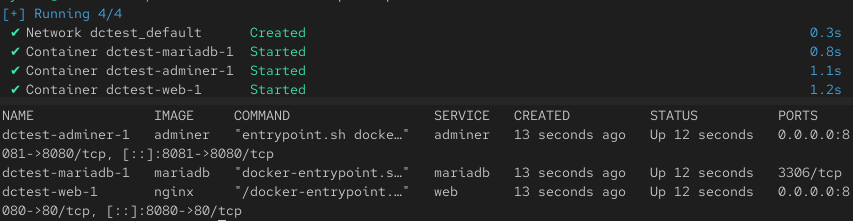
I installed AlmaLinux 10 in VirtualBox and configured bridged networking so the VM had its own address on the lab LAN. I used Docker Compose to run Nginx, MariaDB and Adminer, with a persistent volume for database data.
I checked the services with docker compose ps and loaded the site in a browser on port 8080. Compose mapped that VM port to Nginx’s container port 80. Adminer was published on VM port 8081.
- Lab LANBrowser and separate Kali test VM
- VirtualBox bridged networkAlmaLinux 10 server VM
- Docker ComposeNginx · MariaDB · Adminer
Troubleshoot and harden
- Restrict routine administration
- I created a web operations role and limited its
sudopolicy to selected Docker Compose actions for the deployment. I checked the test account’s permitted commands withsudo -l. - Fix a sudoers validation error
visudo -cflagged the permissions on the policy file. I set its owner and group to root and its file mode to0440, then reran the validator and confirmed that the file parsed successfully.- Automate account provisioning
- I wrote a Bash script to validate input, detect duplicate accounts, create a user, apply password ageing, assign a role group and restrict access to the home directory. I checked those settings on a test account after running the script.

Verify network controls
Host firewall
I set a default-deny inbound policy with UFW and tested a TCP port 80 exception from a separate Kali VM. The recorded scan results show closed with the exception and filtered without it. The site’s browser test was on VM port 8080, so validating firewall behaviour for the published web endpoint was a separate check still to do.
Plaintext HTTP
In a separate training exercise, I used Wireshark to examine an HTTP form submission. The capture showed that submitted fields were readable in transit, which informed my recommendation to use HTTPS before accepting credentials or personal data.

closed, so it did not reach a listening service on that port.
filtered.Outcome and production follow-up
The prototype served the website and ran the database and administration containers. The lab also produced separate evidence for the restricted operations role, scripted user settings and host firewall filtering.
For a production rollout I would add HTTPS, restrict Adminer to approved management access, verify firewall rules against the actual published ports, and keep the Compose configuration and its dependencies under administrator ownership. I would also set up backups, test recovery, and add logging and monitoring.